PayerID Verification with Crosswalk Profile Overview
Payers can differ by their specialization and the set of services they provide, for example, Individual Healthcare, Medicare, and other. This profile demonstrates a system that manages Claims flow based on whether the corresponding Payer has the required specialization.
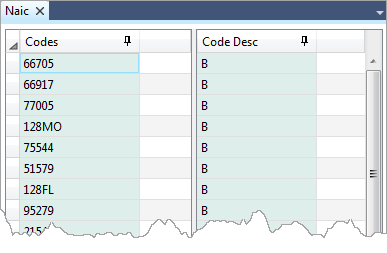
To accomplish this, a simple crosswalk table is used:
Note To view, edit, and register crosswalk files, use Edifecs SpecBuilder.
The crosswalk maps Payer IDs to specialization codes. In this scenario, only two specialization codes "M" and "B" are considered valid. If a Payer ID cannot be found or the Payer specialization code differs from "M" or "B", the corresponding Claim is rejected.
Profile Location
Edifecs Library / Best Practices / Business Cases / PayerID Verification with Crosswalk
Requirements
- Edifecs XEngine 9.0 or later
- Edifecs XEServer 9.0 or later
- HIPAA Standards 9.0 or later
Prerequisites
- In Edifecs Application Manager, add the profile PayerID Verification with Crosswalk from the Edifecs Library. For more information, see Edifecs Library Help Center.
- Register the sample crosswalk. The naic.crsw file becomes available in the directory ${XESProfile}/config/configuration/Crosswalk after you create the sample profile. For detailed instructions on how to register a crosswalk, see the Crosswalk section in SpecBuilder help.
 Profile Execution
A Payer ID exists in the crosswalk, the Payer specialization is either "M" or "B".
- Go to ${XESProfile}/bin and run start.bat to start the profile.
- Copy the sample file Good837DTA.dat from the folder ${XESProfile}/config/configuration/testdata to the directory ${XESWorkspace}/test-data/inbound.
- The validated transaction file appears in the directory ${XESWorkspace}/test-data/outbound/good.
- Open the generated XML report in the directory ${XESWorkspace}/test-data/outbound/report. Search for the property PayerPrimaryID in the report. The property value is present in the report file.
A Payer ID does not exist in the crosswalk.
- Copy the sample file Bad837DTA.dat from the folder ${XESProfile}/config/configuration/testdata/ to the directory ${XESWorkspace}/test-data/inbound.
- The rejected transaction file should appear in the directory ${XESWorkspace}/test-data/outbound/bad.
- Open the generated XML report in the directory ${XESWorkspace}/test-data/outbound/report. The report contains an <Error></Error> block with the following description: "The Payer ID in 2010BB must be on the NAIC table with B or M in Description column."
A Payer ID exists in the crosswalk but the Payer specialization is neither "M" nor "B" but "H".
- Copy the sample file Bad837DTA_HCode.dat from the folder ${XESProfile}/config/configuration/testdata to the directory ${XESWorkspace}/test-data/inbound.
- The rejected transaction file appears in the directory ${XESWorkspace}/test-data/outbound/bad.
- Open the generated XML report in the directory ${XESWorkspace}/test-data/outbound/report. The report contains an <Error></Error> block with the following description: "The Payer ID in 2010BB must be on the NAIC table with B or M in Description column."


