3) Test Scripts Activation Route
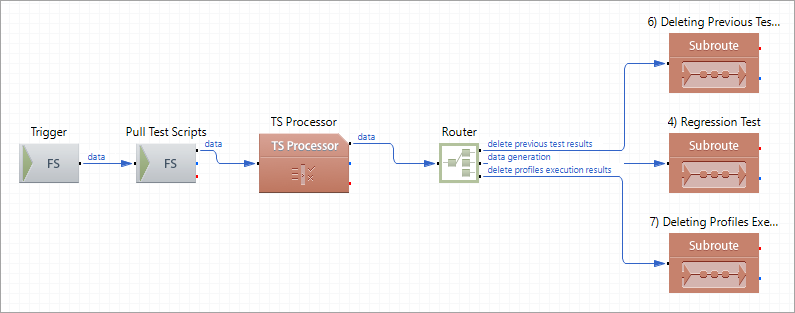
This route is the entry point for the entire profile workflow. The route receives a trigger message (a trigger file and a .properties file) that defines the Regression scenario. The possible workflow scenarios are defined in the trigger .properties files and in the test script. Depending on the trigger file the route has consumed, the route picks up the appropriate Test Script from and runs this script in TS Processor. The script includes the actions, execution rules, and the execution sequence. Then, the Router component sends the data to the three subroutes in sequential order. The subroutes do the following:
Route Structure
Route Components Description
| Trigger
|
FS Inbound |
Picks up a trigger file and a .properties file. The .properties file has properties that define the Regression scenario (which profiles should be tested, which test EDI files to use, and so on). |
| Pull Test Scripts
|
FS Inbound |
When the component receives a trigger message, the component picks up the appropriate TS Script file from the folder ${XESProfileConfig}/artifacts/testScripts and feeds the script to TS Processor. |
| TS Processor
|
TS Processor |
Executes the TS script. The script includes actions, execution rules, and the execution sequence. |
| Router
|
Router |
Sequentially (from top to bottom) directs the data flow to the three subroutes. |
| 6) Deleting Previous Test Results
|
Subroute |
Invokes the route 6) Deleting Previous Test Results to remove test results generated on the previous cycle. |
| 4) Regression Test
|
Subroute |
Invokes the route 4) Regression Test to carry out a new test iteration. |
| 7) Deleting Profiles Execution Results
|
Subroute |
Invokes the route 7) Deleting Profiles Execution Results to remove output data generated by the Original and the Updated profiles. |