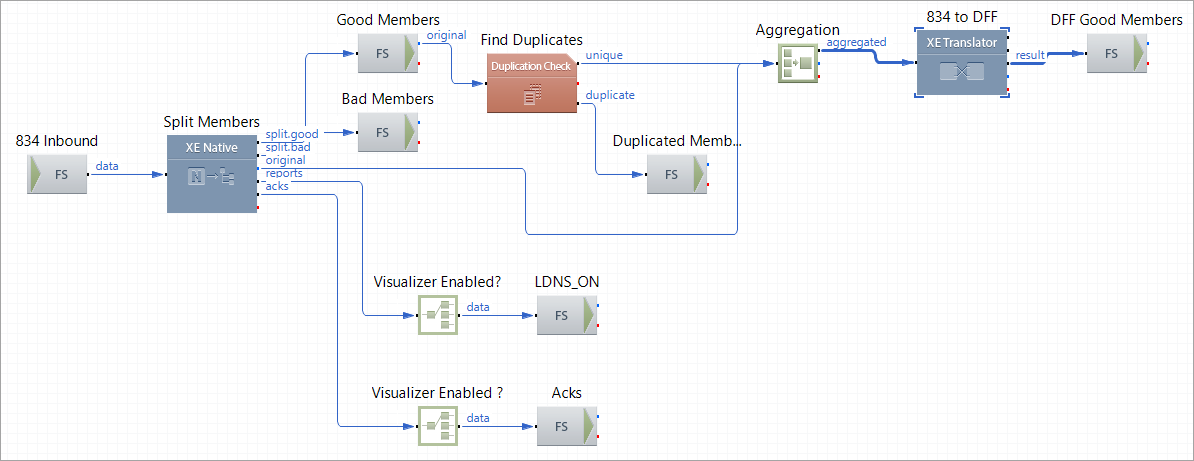
834 to DFF Route

The route splits an 834 EDI transaction by members, checks members for duplication, and translates unique member data to a custom DFF format

Route Structure

834 to DFF Route

Route Components Description

Component Name Component Type Description
834 Inbound FS Inbound Picks up an 834 transaction from the file system.
Split Members XE Native

Validates data, splits enrollments by members based on the property @IsPatient, generates LDNS reports and acknowledgements.

For each member, the component extracts the member ID and sets the data as an XEServer property MemberID.

Good Members FS Inbound

Picks up valid (good) member data.

Find Duplicates Duplication Check Checks the member data against duplication based on the property MemberID.
Aggregation Aggregation Merges all the member data into one batch. The trigger to complete the batch is the original message received from the route component Split Members. The route component Aggregation receives this message after all the valid (good) member data are checked for duplication.
Duplicate Member FS Outbound Stores duplicate member data.
834 to DFF XE Translator Converts the 834 individual member data into a custom DFF format using the map file 834-DFF_Map.ems that available in the directory ${XESProfileConfig}/artefacts.
Bad Members FS Outbound Stores the individual member data files that failed to pass the XEngine validation.
Visualizer Enabled? Router Directs the LDNS reports to Visualizer Server if the profile-level environment property VisualizerEnabled has been set to true.
LDNS_ON FS Outbound Stores the LDNS data for Visualizer Server.
Visualizer Enabled? Router Directs the acknowledgements generated by XEngine to Visualizer Server if the profile-level environment property VisualizerEnabled has been set to true.
Acks FS Outbound Stores acknowledgements for Visual Tracking.