Multisource Mapping Profile Overview
The route Inbound Processing in this profile shows you how to set up the multi-source mapping. The route picks up two X12 EDI files from the file system, merges the files, and translates the resulting data into a PFF file.
Route structure
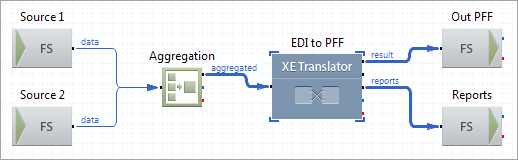
Route Components Description
| Source 1
|
FS Inbound |
Picks up the first set of X12 data files from the file system. |
| Source 2
|
FS Inbound |
Picks up the second set of X12 data files from the file system. |
| Aggregation
|
Aggregation |
Aggregates two messages into one multi-message exchange. |
| EDI to PFF
|
XE Translator |
Translates the aggregated X12 data to PFF using the map file available in the following directory ${XESProfile}\config\configuration\artefacts\Map.ems. The map is set up to allow access to the two sources that use the guideline available in the following directory ${XESProfile}\config\configuration\artefacts\101.ecs. The target uses the Positional Flat File guideline available in the following directory ${XESProfile}\config\configuration\artefacts\INVOIC01.ecs. |
| Out PFF
|
FS Outbound |
Stores the translated PFF data. |
| Reports
|
FS Outbound |
Stores the translation reports. |


