Encounter Outbound Profile Workflow
The profile contains four routes that help XEServer communicate with XProcess Management while processing various claims and creating encounters by using the route component XPM Event and a custom map.
The following steps describe the profile's routes workflow:
Step 1: The route 1 Inbound Processing picks up batches of claims from the file system, splits the data into individual claims, and validates the resulting claims.
Step 2: The route saves all the void claims to the file system. All the original and replacement claims pass through the route components XPM Event that report the state Update or Original of specific objects to XProcess Management based on the property ObjectId.
Step 3: The route creates an encounter using a custom map, converts the data to XData format, and applies Business Rules to the resulting files.
Step 4: The claims that have passed the Business Rules validation go through the route components XPM Event that update the state of specific objects in XProcess Management based on the property ObjectId to Submit to State or Submit to CMS фтв based on the claim's Line of Business.
Step 5: The route submits claims that have not passed the Business Rules validation for correction.
Step 6: The route submits data that has passed the Business rules validation to a back-end system (emulated by the route 2 BE Processing) and sends the response received in return for further processing on the subroute 3 Process Response.
Step 7: The subroute picks up the response, and based on the response body, either sends claims for correction or updates the state of the specific objects in XProcess Management based on the property ObjectId to End.
This profile contains the following routes:
 1 Inbound Processing
This route handles the basic processing flow for an encounter. The route splits the incoming file into separate claims, creates an encounter, validates the data, and submits the encounter to a back-end system through a REST client. Then the route sends the response received from the back-end system (emulated by the route 2 BE Processing) for further processing on the subroute 3 Process Response.
Route Structure
Route Components
| Encounter In
|
FS Inbound
|
Picks up claims from the file system.
|
| From Previous Process
|
FS Inbound
|
Picks up claims that have passed adjudication and have been paid after processing on the routes in the profile Claim Inbound.
|
| Split by Claims
|
Native Processing
|
Splits the incoming batch into separate claims and adds the following message properties for each good claim:
- ChargeAmount
- ClaimDate
- ClaimID
- ClaimIndicator
- EncounterID
- EncounterType
- Guideline.XSDNames.X12
- PayerID
- PayerName
|
| Router
|
Router
|
Redirects the data based on the claim type.
|
| Internal Void
|
FS Outbound
|
Stores all the void claims on the file system.
|
| Updated Event
|
XPM Event
|
Notifies XProcess Management that the state of an object with a specific ObjectId has changed to Update.
|
| Original Event
|
XPM Event
|
Notifies XProcess Management that the state of an object with a specific ObjectId is Original.
|
| Encounter Creation
|
Translator
|
Creates an encounter based on the map AdjudicationFormat.ems that is available in the directory ${XESRoot}/profiles/Encounter Outbound/config/configuration/Maps.
|
| Convert to XData
|
Native Processing
|
Converts the incoming data to XData format.
|
| From Correction
|
FS Inbound
|
Picks up claims that have undergone manual or automated correction.
|
| Business Rules
|
Business Rules
|
Validates the data against Business Rules.
|
| To Correction
|
FS Outbound
|
Stores the data that have not passed the Business Rules validation.
|
| XData Processing
|
XData Processing
|
Converts the incoming data to the native format.
|
| Claim Indicator
|
Router
|
Redirects the data based on the Claim Indicator (Medicare or Medicaid).
|
| Submit to State
|
XPM Event
|
Notifies XProcess Management that the state of an object with a specific ObjectId has changed to Submit to State.
|
| Submit to CMS
|
XPM Event
|
Notifies XProcess Management that the state of an object with a specific ObjectId has changed to Submit to CMS.
|
| Submit
|
REST Client
|
Submits data to a back-end system (emulated by the route 2 BE Processing) through an HTTP POST request.
|
| Aggregation
|
Aggregation
|
Merges the response from the back-end system and the original data into a single multi-message exchange.
|
| Process Response
|
Subroute
|
Sends the incoming data for further processing on the subroute 3 Process Response.
|
2 BE Processing
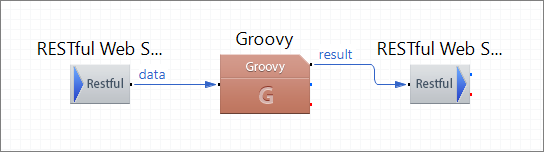
This route emulates the processing in a back-end system by picking up the incoming data through a RESTful Web Service, setting correction parameters
based on the contents of the data file, and by submitting the resulting file back to the route 1 Inbound Processing.
Route Structure
Route Components Description
| RESTful Web Service Inbound
|
RESTful Web Service Inbound
|
Picks up the data submitted by the route 1 Inbound Processing.
|
| Groovy
|
Groovy
|
Creates a response with the correction parameters passed as message properties for further submission to the route 1 Inbound Processing.
|
| RESTful Web Service Outbound
|
RESTful Web Service Outbound
|
Submits an emulated response from the back-end system to the route 1 Inbound Processing.
|
3 Process Response
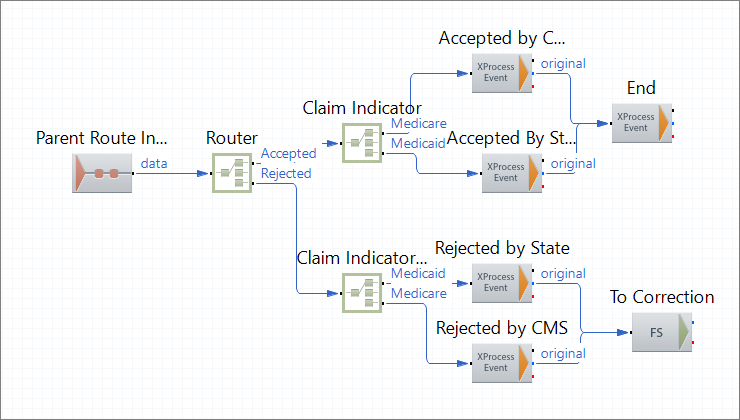
This route picks up the response from the back-end system (emulated by the 2 BE Processing route), and based on the response body, sends data to the corresponding endpoint.
Route Structure
Route Components Description
| Parent Route Input
|
Parent Route Input
|
Picks up the back-end system response from the parent route 1 Inbound Processing.
|
| Router
|
Router
|
Redirects the data based on status (Accepted or Rejected).
|
| Router
|
Claim Indicator
|
Redirects the accepted data based on the Claim Indicator (Medicare or Medicaid).
|
| Accepted by CMS
|
XPM Event
|
Notifies XProcess Management that the state of an object with a specific ObjectId has changed to Accepted by CMS.
|
| Accepted by State
|
XPM Event
|
Notifies XProcess Management that the state of an object with a specific ObjectId has changed to Accepted by State.
|
| End
|
XPM Event
|
Notifies XProcess Management that the state of an object with a specific ObjectId has changed to End.
|
| Claim Indicator_1
|
Router
|
Redirects the rejected data based on the Claim Indicator (Medicare or Medicaid).
|
| Rejected by State
|
XPM Event
|
Notifies XProcess Management that the state of an object with a specific ObjectId has changed to Rejected by State.
|
| Rejected by CMS
|
XPM Event
|
Notifies XProcess Management that the state of an object with a specific ObjectId has changed to Rejected by CMS.
|
| To Correction
|
FS Outbound
|
Stores the claims that require correction on the file system.
|
4 Correction
This route emulates a correction system by picking up invalid claims, by storing claims that require manual correction on the file system, and by transforming claims intended for automated correction based on a Velocity template.
Route Structure
Route Components Description
| FS Inbound
|
FS Inbound
|
Picks up claims that require correction from the file system.
|
| Router
|
Router
|
Redirects the claims based on whether the data requires manual or automated correction.
|
| Manual Correction
|
FS Outbound
|
Stores the claims that require manual correction on the file system.
|
| Automatic Correction Mock
|
Velocity
|
Emulates automated correction based on the Velocity template GoodClaim.dat that is available in the directory ${XESRoot}/profiles/Encounter Outbound/config/configuration/Templates.
|
| Split by Claims
|
Native Processing
|
Splits the corrected file into separate claims and validates the data.
|
| Back to System
|
FS Outbound
|
Stores the corrected claims that are ready for further processing on the route 1 Inbound Processing on the file system.
|