Sample Duplication Check Real-World Example Profile Workflow
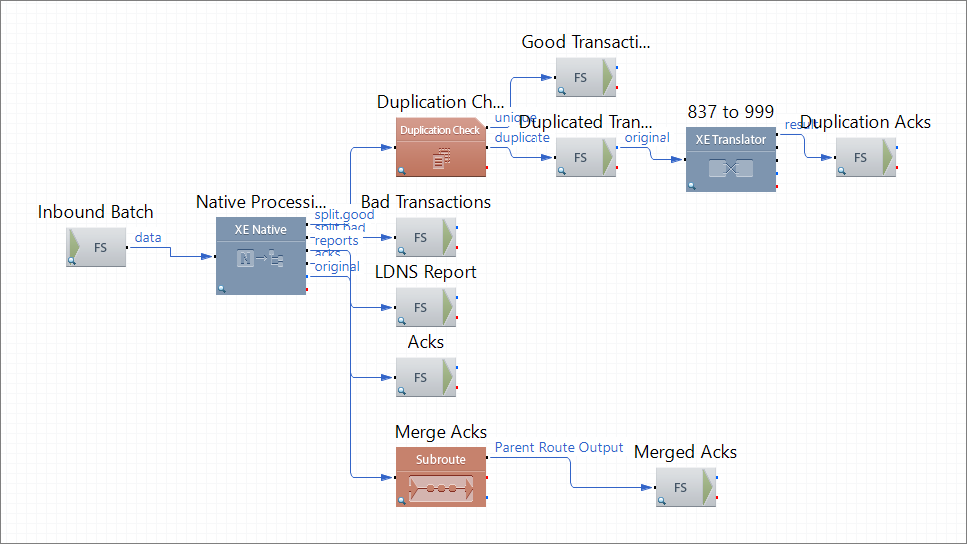
This profile picks up an 837 batch file from the file system. Then the route component XE Native splits the transaction, validates the data, and generates an LDNS report and acknowledgments. The main route directs the data to the component Duplication Check to see if there are any duplicates based on the following criteria:
| SUBMITTERID |
ISA06 |
| CLAIMCOUNT |
Number of CLM segments within ST-SE |
| SERVICELINECOUNT |
Number of LX segments within ST-SE |
| RECORDCOUNT |
Number of segments within ST-SE |
| TOTALCHARGEAMOUNT |
Total of all CLM02 within ST-SE |
| FIRSTFIRSTNAME |
First firstname of Patient within ST-SE, else Subscriber |
| LASTFIRSTNAME |
Last firstname of Patient within ST-SE, else Subscriber |
| FIRSTLASTNAME |
First lastname of Patient within ST-SE, else Subscriber |
| LASTLASTNAME |
Last lastname of Patient within ST-SE, else Subscriber |
| FIRSTSUBSCRIBERID |
First subscriber id within ST-SE |
| LASTSUBSCRIBERID |
Last subscriber id within ST-SE |
| FIRSTLINEAMOUNT |
First CLM02 of ST-SE |
| LASTLINEAMOUNT |
Last CLM02 of ST-SE |
| FIRSTSERVICEDATE |
Inst: first 2400 DTP 472, else BHT04 |
| LASTSERVICEDATE |
Inst: last 2400 DTP 472, else BHT04 |
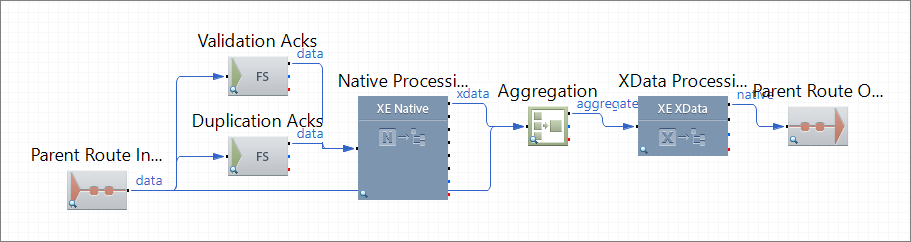
The profile saves all the valid and unique claims on the file system and generates 999 Acknowledgment for the duplicate claims. The corresponding subroute aggregates all the validation and duplication check acknowledgments and converts the resulting data to the native format. The main route saves the merged acknowledgments on the file system.
This profile has the following routes:
 1 Inbound Processing
This route picks up an 837 batch file and splits and validates the data. The route saves all the invalid transactions in the file system and checks the valid transactions for duplicates. The corresponding route component saves all the duplicate transactions in the file system. The route sends all the acknowledgments generated during data processing to the subroute for merging and saves the resulting file to the file system.
Route Structure
Route Components Description
| Inbound Batch |
FS Inbound |
Picks up the incoming 837 5010X222A1 batch file from the file system. |
| Nativ Processing |
XE Native |
Splits and validates the incoming transactions and generates an LDNS report and acknowledgments. |
| Duplication Check
|
Tracking and Duplication |
Checks claims for duplicates based on specified parameters. |
| Bad Transactions
|
FS Outbound |
Saves the invalid claims on the file system. |
| LDNS Report
|
FS Outbound |
Saves the LDNS report to the file system. |
| Acks
|
FS Outbound |
Saves acknowledgments on the file system. |
| Merge Acks
|
Subroute |
Sends data for processing on the subroute. |
| Merged Acks
|
FS Outbound |
Saves the merged acknowledgments on the file system. |
| Good Transactions
|
FS Outbound |
Saves all the good transactions that have passed the duplication check in the file system. |
| Duplicated Transactions
|
FS Outbound |
Saves all the transactions that have not passed the duplication check to the file system. |
| 837 to 999
|
Translator |
Translates the duplicated transactions to 999 Acknowledgments based on the available map. |
| Duplication Acks
|
FS Outbound |
Saves all the duplication check acknowledgments on the file system. |
2 Merge Acks
This subroute merges all the acknowledgments received from the parent route into a single file.
Route Structure
Route Components Description
| Parent Route Input |
Parent Route Input |
Receives a trigger from the parent route to initiate data processing. |
| Validation Acks |
FS Inbound |
Picks up the validation acknowledgments from the file system. |
| Duplication Acks
|
FS Inbound |
Picks up the duplication check acknowledgments from the file system. |
| Native Processing
|
Native Processing |
Converts the incoming data to XData format. |
| Aggregation
|
Aggregation |
Merges the incoming data into a single multimessage exchange. |
| XData Processing
|
XData Processing |
Translates the incoming data to the native format. |
| Parent Route Output
|
Parent Route Output |
Sends the resulting data back to the parent route. |