|
|||||||||||||||||||||||||||||||||||||||||||||||||||||||
Partner-Specific Mailbox Profile WorkflowAt a high-level, the profile has the following flow:
This profile is extendable and can be adjusted to your business needs. Here are a few options on how to do this:
 Redirecting Messages to MailBox Route Redirecting Messages to MailBox Route
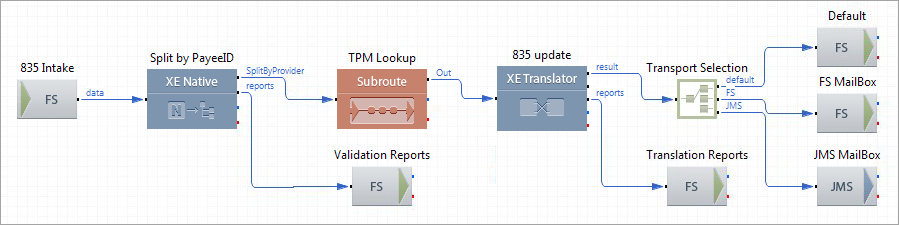
On this route, an incoming 835 Claim Payment transaction is split into individual Provider transactions and an emulated Transaction Management system extracts the required information on the Provider. Then, an 835 Claim Payment transaction is created with corresponding updated segments, and finally directed to the required destination. Route Structure
Route Components Description
TPM Lookup Route
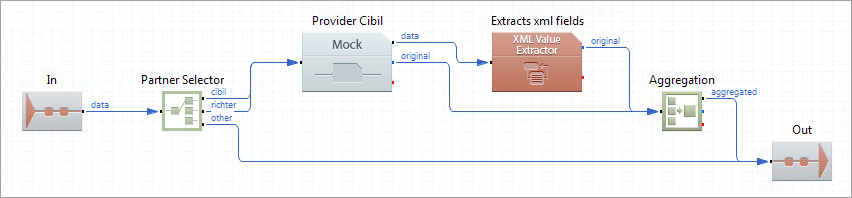
This route emulates the Trading Partner Management system. If you are using Transaction Management, this route can be replaced by the route component TPM Lookup. The route receives individual 835 Claim Payment transactions and for every transaction, picks up a suitable XML file from the file system based on the XEServer property ProviderID. The matching XML file contains detailed information about the required Provider. Then, ProviderParameters are extracted from the XML file, and the individual 835 Claim Payment transaction along with ProviderParameters is sent back to the route Redirecting Messages to MailBox. Route Structure
Route Components Description
|