|
||||||||||||||||||||||||||||||||||||||||||||||
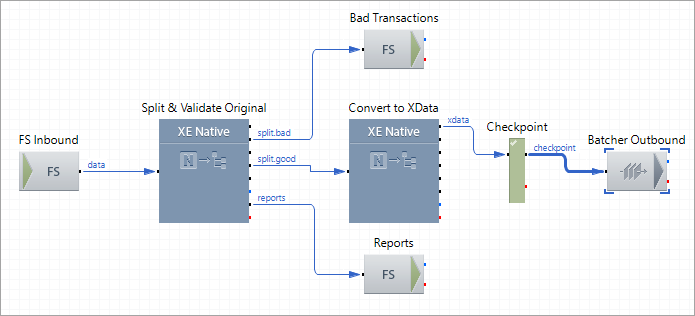
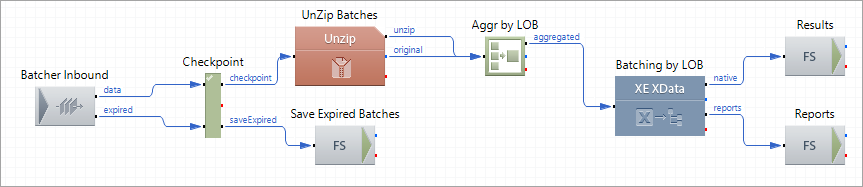
835 Outbound Sample Profile WorkflowThis sample profile batches 835 transactions by the Line of Business (LOB) based on the Scheduler Batching Strategy. Step 1. The profile picks up a data file with 835 transactions, validates the data, and splits the file into individual transactions. In this step, the profile extracts the value of the LOB for each valid transaction. Step 2. The profile converts all the valid transactions to the XData format and stores them in the Batcher Outbound storage. The Batcher service uses the LOBs extracted on the previous step as the Batch Group Correlation IDs. Step 3. When the Batcher Completion condition is met, the Batcher Inbound component activates and streams the items out from the storage. Step 4. The profile extracts the items from the Batcher Inbound in the form of zip archives for easier transmission and handling. Unzips the received items and aggregates the results by LOB into a multimessage exchange. Step 5. By using the batch mode, the XData Processing component converts data into the native format, combining similar (with the same LOB) XData transactions into a single native result. Step 6. Stores the conversion results in the File System component Results. Each folder in Results represents a separate LOB – particularly, the Payee Name. The Batcher Completion condition uses a Scheduler Batching Strategy named 835Processing. This strategy defines the rule (to batch every minute) and the system identifies the moment when the data storage is ready for the batching session. This profile has the following routes:  1 Split and Batch Mode 1 Split and Batch Mode
This route picks up a batch file with 835 transactions, validates the data, and splits the file into individual transactions. Then, the route extracts the value of Line of Business (LOB) for each valid transaction by using the data node macro {DN[dns.fnm.Transaction.prp.PayeeName]}. The route converts all valid transactions to the XData format and stores them in the Batcher Outbound storage. The LOBs are used as Batch Group Correlation IDs. Route Structure
Route Components Description
2 Batch Out Route
When the Batcher meets the Completion condition, the Batcher Inbound component activates and streams the items out from the storage. The route extracts the items from Batcher Inbound in the form of zip archives for easier transmission and handling. Then, the route unzips the received items and aggregates the results by LOB into a multimessage exchange. By using the batch mode, the XData Processing component converts data into the native format, combining similar (having the same LOB) XData transactions into a single native result. Finally, the route stores the conversion results on the file system (route component Results). Each folder in Results represents the separate LOB – particularly, the Payee Name. Route Structure
Route Components Description
|