|
||||||||||||||||||||||||||||||||||||||||||||||
834 to DFF with Sorting Profile WorkflowThis profile picks up a batch of 834 transactions, validates the data, splits the file into individual enrollments. Then, the corresponding route converts individual enrollment documents to a custom DFF format and stores the result in XEServer Data Storage. The profile uses the Balance Counters feature to activate the Reorder route after all enrollments are processed. The corresponding route extracts the DFF enrollments from the data storage and sorts the enrollments firstly by Suscriber ID, and then by Maintenance Type. This profile has the following routes:  Enrollment Route Enrollment Route
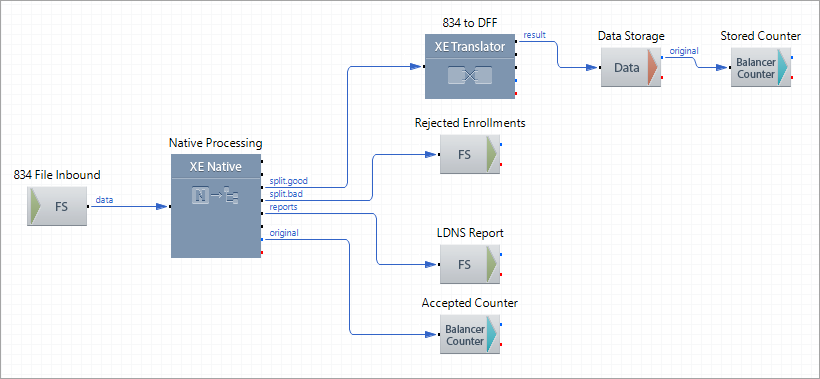
This route receives a file with multiple 834 Benefit Enrollment and Maintenance EDI documents, validates and splits the file into individual enrollments using the Native Processing component. All the accepted enrollments are converted to a custom DFF format using XE Translator, and are stored in XEServer Data Storage. The Balance Counters outbound components (Accepted Counter and Stored Counter) track the number of enrollments after the splitting and mapping respectively to verify that the number of accepted individual enrollments received as input matches the number of individual enrollments stored in XEServer Data Storage. Route structure
Route Components Description
Reorder Route
This route starts once the Balance Counter Completion Expression (Completed==Total) is met which means that the number of HIPAA-formatted enrollments in the input batch is the same as the number of DFF enrollments stored in the data storage. The route extracts DFF enrollments from the data storage and sorts them by Suscriber ID and Maintenance Type. Route structure
Route Components Description
|