|
||||||||||||||||||||||||||||||||||
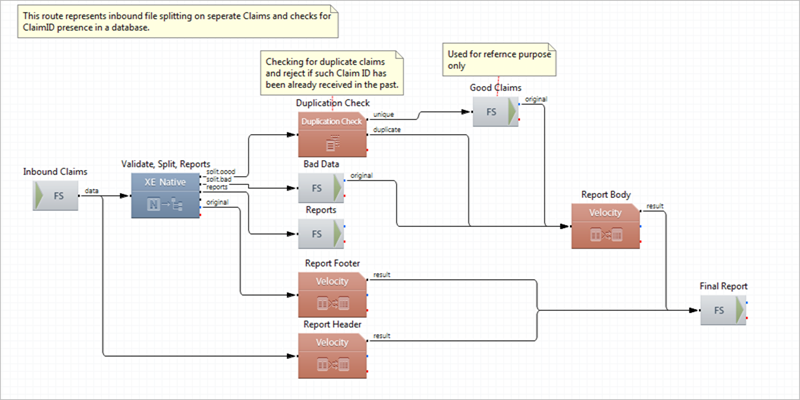
Sample Duplication Check Profile WorkflowThe route Duplicate Claims Check in this profile picks up an 837 transaction from the file system. Then the XE Native component splits the transaction by claims and validates the data. Valid claims obtain a set of properties, including the ClaimID property. The route directs the data to the Tracking and Duplication component. If a claim is processed for the first time, the route registers the ClaimID in the Elasticsearch Node Storage and directs the claim to the Good Claims output folder. If a claim was processed before, and the ClaimID already exists in the Elasticsearch Node Storage, the route directs the claim for further processing. An HTML processing report is generated, depending on the processing result. Note A check for duplication can be performed by any property. This allows you to detect unique and duplicate items not only in the scope of ClaimID, but in the scope of providerID, subscriberID, transactionID and other. The route Duplicate Claims Check has the following structure:
|