Claim Inbound Profile Workflow
The profile contains four routes that help XEServer communicate with XProcess Management while processing various claims by using the route component XPM Event.
The following steps describe the profile's routes workflow:
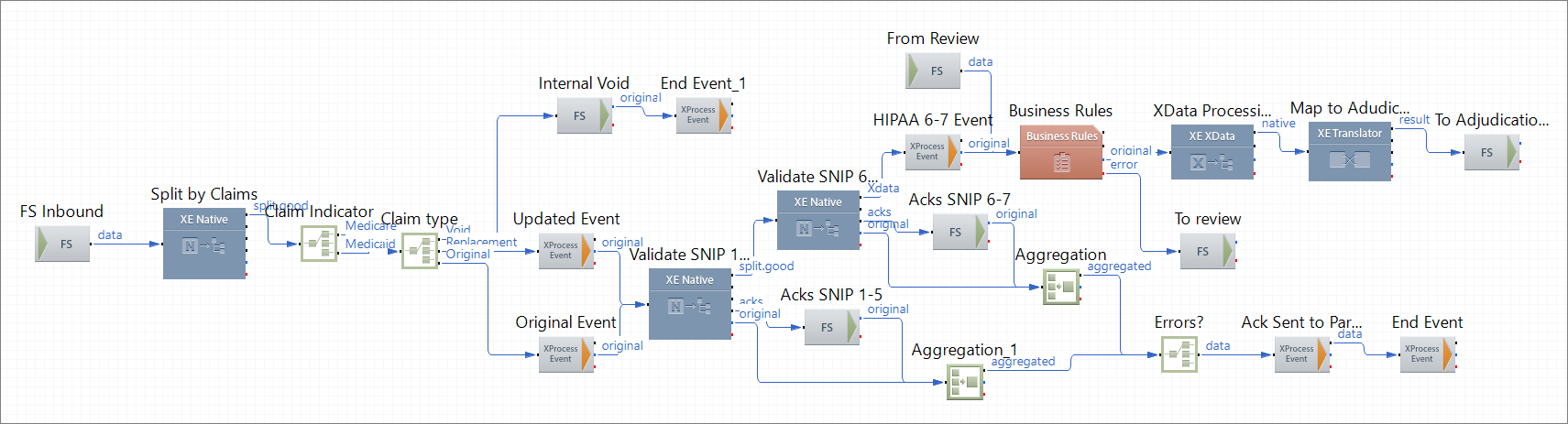
Step 1: The route 1 InboundValidation picks up batches of claims from the file system, splits the data into individual claims, and validates the resulting claims.
Step 2: The route saves all the void claims to the file system, and the route component XPM Event reports the state End of a specific object to XProcess Management based on the property ObjectId.
Step 3: All the original and replacement claims pass through the route components XPM Event that report the state Update or Original of specific objects to XProcess Management based on the property ObjectId.
Step 4: The route performs SNIP 1-5 and SNIP 6-7 validation and generates acknowledgements. After the SNIP 6-7 validation, the route component XPM Event reports the state HIPAA Validated SNIP 6-7 of a specific objectto XProcess Management based on the property ObjectId .
Step 5: Based on whether the SNIP validation acknowledgements indicate an error, another route component XPM Event reports the state Rejection Ack Sent to Partner of a specific object to XProcess Management based on the property ObjectId.
Step 6: The route applies Business Rules to separate claims that have successfully passed SNIP 1-7 validation.
Step 7: The route translates the claims to the Adjudication format based on the map AdjudicationFormat.ems that is available in the directory ${XESProfileConfig}/configuration/Maps and submits the data to an Adjudication system (emulated by the route 3 Backend Emulation).
Step 8: If any errors occur during the emulated adjudication, the route submits the data for correction (emulated by the route 2 Business Rules Review).
This profile contains the following routes:
 1 InboundValidation
This route represents the main processing flow. The route picks up a batch of claims from the file system, splits the data, and validates the resulting individual claims. Then the route saves all the void claims to the file system and sends all the replacement and original claims for SNIP 1-7 validation. The route submits all the claims that have not passed the SNIP validation for correction (emulated by the route 2 Business Rules Review). The route component Business Rules validates the claims against the Business rules. The route converts all the claims that have passed validation to the native format, transforms the resulting data to the adjudication format, and then submits the claims for adjudication (emulated by the route 3 Backend Emulation).
Route Structure
Route Components
| FS Inbound
|
FS Inbound
|
Picks up a batch of claims from the file system.
|
| Split by Claims
|
Native Processing
|
Splits the incoming batch into separate claims and adds the following message properties for each good claim:
- ChargeAmount
- ClaimDate
- ClaimID
- ClaimIndicator
- ClaimType
- ObjectId
- Sender
|
| Claim Indicator
|
Router
|
Adds a Line of Business (LOB) message property (Medicare or Medicaid) based on the value of the property ClaimIndicator.
|
| Claim type
|
Router
|
Redirects the data based on the claim type.
|
| Internal Void
|
FS Outbound
|
Stores all the void claims on the file system.
|
| End Event_1
|
XPM Event
|
Notifies XProcess Management that the state of an object with a specific ObjectId has changed to End.
|
| Updated Event
|
XPM Event
|
Notifies XProcess Management that the state of an object with a specific ObjectId has changed to Original Claim.
|
| Original Event
|
XPM Event
|
Notifies XProcess Management that the state of an object with a specific ObjectId has changed to Update Claim.
|
| Validate SNIP 1-5
|
Native Processing
|
Performs SNIP 1-5 validation and generates acknowledgements.
|
| Acks SNIP 1-5
|
FS Outbound
|
Stores acknowledgements generated by the route component Validate SNIP 1-5 on the file system.
|
| Aggregation_1
|
Aggregation
|
Merges the properties of the original claim and the SNIP 1-5 validation acknowledgements into a single message based on the property ObjectId.
|
| Validate SNIP 6-7
|
Native Processing
|
Converts the incoming data to XData format, performs SNIP 6-7 validation, and generates acknowledgements.
|
| Acks SNIP 6-7
|
FS Outbound
|
Stores acknowledgements generated by the route component Validate SNIP 1-5 in the file system.
|
| Aggregation
|
Aggregation
|
Merges properties of the original claim and the SNIP 6-7 validation acknowledgements into a single message based on the property ObjectId.
|
| Errors?
|
Router
|
Only passes data that has SNIP validation errors.
|
| Ack Sent to Partner
|
XPM Event
|
Notifies XProcess Management that the state of an object with a specific ObjectId has changed to Rejection Ack Sent to Partner.
|
| End Event
|
XPM Event
|
Notifies XProcess Management that the state of an object with a specific ObjectId has changed to End.
|
| HIPAA 6-7 Event
|
XPM Event
|
Notifies XProcess Management that the state of an object with a specific ObjectId has changed to HIPAA Validated SNIP 6-7.
|
| Business Rules
|
Business Rules
|
Applies Business rules that are available in the directory ${XESProfileConfig}/configuration/Drools.
|
| To review
|
FS Outbound
|
Stores the claims that were not successfully processed by the route component Business Rules for a review in the file system.
|
| From Review
|
FS Inbound
|
Picks up claims that have been reviewed from the file system.
|
| XData Processing
|
XData Processing
|
Converts the data to the native file format.
|
| Map to Adjudication Format
|
Translator
|
Transforms the incoming data to the Adjudication format based on the map AdjudicationFormat.ems that is available in the directory ${XESProfileConfig}/configuration/Maps
|
| To Adjudication System
|
FS Outbound
|
Stores the resulting data ready for submission to an Adjudication System in the file system.
|
2 Business Rules Review
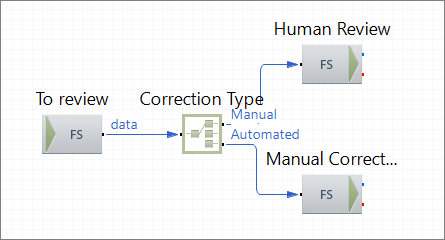
This route picks up rejected claims that require a review, and based on the correction type, redirects the data for manual or automated correction.
Route Structure
Route Components Description
| To review
|
FS Inbound
|
Picks up invalid claims submitted for review from the file system.
|
| Correction Type
|
Router
|
Redirects claims based on whether the data requires manual or automated correction.
|
| Human Review
|
FS Outbound
|
Stores the claims that require manual correction.
|
| Manual Correction
|
FS Outbound
|
Stores the claims that require automated correction.
|
3 Backend Emulation
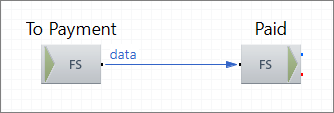
This route emulates adjudication processing in a back-end system.
Route Structure
Route Components Description
| To Payment
|
FS Inbound
|
Picks up valid claims that have passed adjudication.
|
| Paid
|
FS Outbound
|
Stores the claims that have been paid (emulated) on the file system.
|
4 From Adjudication System
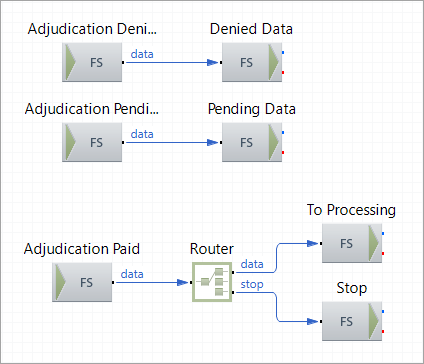
This route picks up claims that have been paid , denied, or are pending adjudication from the back-end system (emulated by the route 3 Backend Emulation) and stores the data in the corresponding folders on the file system.
Route Structure
Route Components Description
| Adjudication Paid
|
FS Inbound
|
Picks up claims that have passed adjudication.
|
| Router
|
Router
|
Redirects claims based on whether the data requires additional processing.
|
| To Processing
|
FS Outbound
|
Stores claims in the file system for further processing on the routes in the profile Encounter Outbound.
|
| Stop
|
FS Outbound
|
Stores claims in the outbound folder To Adjudication Paid Processing.
|
| Adjudication Denied
|
FS Inbound
|
Picks up claims that have not passed adjudication.
|
| Denied Data
|
FS Outbound
|
Stores claims in the outbound folder Adjudication Denied.
|
| Adjudication Pending
|
FS Inbound
|
Picks up claims that are pending adjudication from the file system.
|
| Pending Data
|
FS Outbound
|
Stores claims in the outbound folder Adjudication Pending.
|